
Availability and Pricing: This integration is available to Premium customers with the Enhanced Workload Package. It is included at no additional cost until Q4 2026.
Prerequisites
Before you connect a Claude Enterprise organization to Orca, you need the following:
- A Claude Enterprise plan
- A read-only Compliance API Key for the Claude Compliance API with the required scopes
- For a single-organization connection, the organization ID, a UUID that identifies the Claude Enterprise organization to connect
Required Scopes
Each scope on the key controls what Orca can read from your tenant.
| Scope | Why Orca needs it |
|---|---|
read:compliance_org_data | Lists the organizations in your tenant. |
read:compliance_user_data | Lists the users in each organization. |
Generating a Compliance API Key
Only the primary owner of the parent organization can generate a Compliance API Key, and the Compliance API must be enabled before one exists. Generate the key in claude.ai before you start connecting in Orca.
Note: Generate a Compliance API Key, not an Admin API key. Admin API keys only reach the Activity Feed. They can't provide the organization and user data Orca needs, and the connection fails if you enter one.
If you're not the primary owner, ask the primary owner to generate the key and send it to you.
To generate a Compliance API Key:
- In claude.ai, go to Organization settings > API > Keys.
- Click Create key.
- Name the key and select the required read scopes.
- Click Create.
Important: Copy the key immediately. Anthropic shows the secret only once.
Connecting a Single Organization
Connect a single organization when you want Orca to scan only that organization's identities and access, without adding the rest of the tenant.
To connect a single organization:
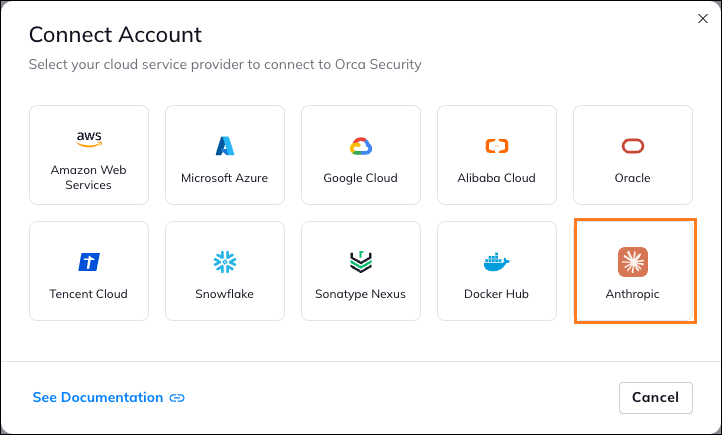
- Go to Settings > Connections > Account Center > Cloud Accounts tab, and click Connect Account, and select Anthropic.
- Under Connection settings, select Default.
- In Tenant name, type a name for a new tenant, or select an existing tenant to add the organization to it.
- In Compliance API Key, paste the key you generated.
- In Organization ID, enter the UUID of the organization to connect.
- Click Connect.
Connecting Multiple Organizations
Connect a whole tenant when you want Orca to scan every organization under it, including new organizations.
To connect multiple organizations at once:
- Go to Settings > Connections > Account Center > Cloud Accounts tab, and click Connect Account, and select Anthropic.
- Under Connection settings, select Multiple.
- In Tenant name, type a name to identify the tenant.
- In Compliance API Key, paste the key you generated.
- To preview how many organizations will connect, click Discover organizations.
- Click Connect.
Disconnecting Your Claude Enterprise Account
Orca doesn't deploy anything in your Claude Enterprise environment, so disconnecting takes two separate actions: deleting the account from Orca and deleting the key in Claude Enterprise.
Note:
You need the Editor or Administrator role in Orca to delete an account.
Only a primary owner can delete a Compliance API Key.
To disconnect your Claude Enterprise account:
- In Orca, go to Settings > Connections > Account Center, and find the Claude Enterprise account.
- Click More Actions
 next to the Claude Enterprise account and select Delete.
Deleting the account removes it and all its alerts, inventory, and compliance results from Orca. - In claude.ai, go to Organization settings > API > Keys, and delete the Compliance API Key.
Deleting the key takes effect immediately. Compliance API Keys don't expire on their own, so deleting the key is the only way to revoke it.
Troubleshooting
If the connection to Claude Enterprise fails, match the cause to a fix.
| If the connection fails because... | Do this |
|---|---|
| Orca can't reach the Compliance API | Retry the connection, and check your network egress and firewall rules. |
The key is missing the read:compliance_org_data scope | Regenerate the key with that scope. |
The key is missing the read:compliance_user_data scope | Regenerate the key with that scope. |
| No organizations are linked to the key | Confirm the key belongs to the right tenant, and that the tenant has at least one organization. |
| The key is invalid or revoked | Generate a new key and enter it. |
| You entered an Admin API key instead of a Compliance API Key | Generate a Compliance API Key in claude.ai and enter that instead. |
| Scopes aren't available, or the API page isn't visible, when creating the key | Ask the primary owner to enable the Compliance API in claude.ai, then generate the key again. |